Coverage: Decode for most 1981-and-later vehicles; sticker-based build sheets vary by brand and model year
What a build sheet is
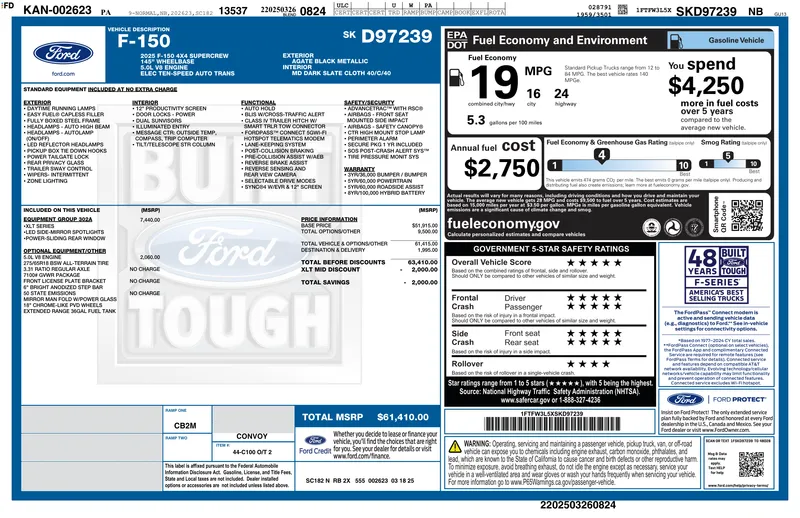
At the factory, every car is built to a list of options and components. That record is the build sheet. Older build sheets were often paper and sometimes turned up stuck under a seat or behind a panel. Today the information sits in the manufacturer’s systems, and most of it also ends up, in plain English, on the window sticker.
For a used-car buyer, a build sheet answers simple questions: which engine, which packages, which trim, and what did it cost new?
What our build sheet shows
There are two levels, and we always tell you which one you’re looking at.
With the original window sticker
When we have the sticker, the $9.99 Full Report parses it into a clean build sheet:
- Standard equipment for the trim
- Optional packages and individual options, each with its original price
- Base MSRP, destination charge and total MSRP
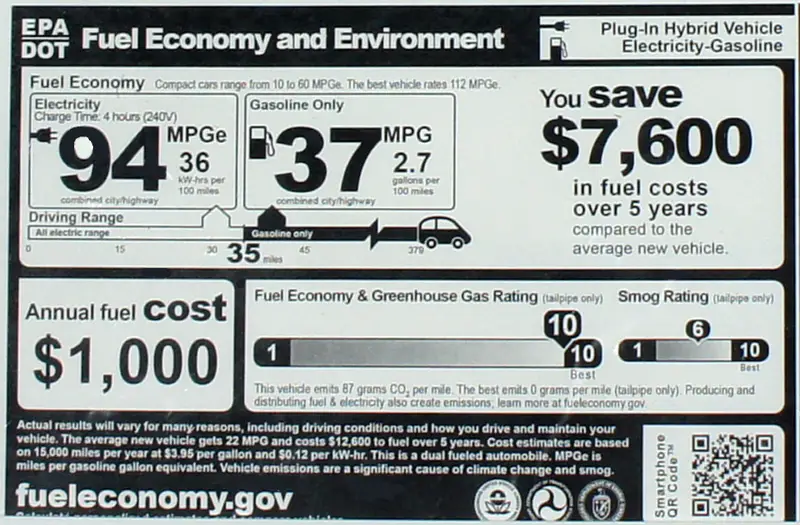
- EPA fuel economy
- Final assembly plant
- Exterior and interior color names
Without a sticker
For every brand, the free NHTSA vPIC decode gives you:
- Year, make, model, trim and series (where the manufacturer reported them)
- Body style, engine, drivetrain and fuel type
- Assembly plant where reported
- The number of NHTSA recall campaigns for that make, model and year, with a link to nhtsa.gov to check your exact VIN
This is labeled “decoded data, not the original sticker”. It’s useful, but it won’t list individual packages or prices.
Where the sticker comes from, by brand
| Brand | Sticker-based build sheet |
|---|---|
| Ford, Lincoln | From Ford’s own system when Ford has released the sticker, as part of the $9.99 Full Report. Best for recent model years; older VINs often return “not yet released”. |
| Chevrolet, GMC, Buick, Cadillac, Jeep, Ram, Dodge, Chrysler, Fiat, Alfa Romeo, Hyundai, Genesis, Kia, Toyota, Lexus, Nissan, Mitsubishi | Through a licensed partner, as part of the $9.99 Full Report. A free check first tells you whether one is on file. |
| Honda, Acura, Subaru, Volkswagen, Audi, BMW, Mercedes-Benz, Tesla, Porsche, Mazda, Volvo and others | No sticker source. Free decode only. |
If no sticker exists, we say so before you pay.
Why a plain VIN decoder can’t show options
A VIN is 17 characters. The first three identify the manufacturer, the next several describe the vehicle (model line, body, engine and restraints, depending on the brand), the 10th is the model year, the 11th is the plant, and the last six are the serial number.
That’s enough to identify the model and engine, but not every option. A sunroof, a towing package or a technology group usually isn’t encoded. That’s why “VIN decoder with options” results without a sticker or build record should be treated with caution. If a site lists options it couldn’t have decoded, ask where they came from.
Brand option codes
Manufacturers have their own way of naming options, and knowing the format helps you read a build sheet:
- GM uses three-character RPO codes, printed on the Service Parts Identification label or, from 2018, behind a QR code on the certification label. See GM build sheet.
- Ford groups features into equipment groups with codes such as “302A” that appear on the sticker. See Ford build sheet.
- Jeep, Ram, Dodge and Chrysler list named packages and groups on the sticker. See Mopar build sheet and Jeep build sheet.
- Toyota stickers list packages and options by name with prices. See Toyota build sheet.
For brands without a sticker source, see BMW, Mercedes and Porsche for what you can still find out.
How to use a build sheet on the lot
- Match the VIN. Check that the VIN in the listing matches the dashboard and the door jamb.
- Confirm the trim. Compare the badge with the trim on the build sheet. See what trim is my car.
- Check the expensive packages. If the listing mentions a tow package, premium audio or driver-assist group, look for it by name.
- Look for swaps. A different engine, wheels or interior color from the build sheet may be innocent, but it’s worth asking about.
- Compare the price. The original total MSRP helps you judge whether the asking price and the claimed equipment add up.
The Full Report
The $9.99 Full Report is a one-time payment, with no subscription and no account. It has the original sticker PDF where one is on file, the MSRP breakdown (base price, options total, destination), every factory option and package with its original price, the paint code and full recall details, all in one PDF with a permanent link. With no sticker on file, it gives the decoded build data, full recall details and owner complaint counts, but no option prices or matched paint code. It’s optional. The decode stays free.
Sources
- NHTSA vPIC VIN decoder, the free federal database behind our decode
- NHTSA recall lookup, to check open recalls on your exact VIN
Last updated November 5, 2026.